Figma Integration: From Embeds to a Real Design Model
Connecting Figma components to their coded counterparts, with stable references that survive file changes.
Knapsack is a B2B enterprise SaaS platform for design systems, software that helps product teams build, document, and publish their design foundations at scale.
01 — Overview & Problem
What we were trying to solve
Knapsack already had a way to bring Figma into docs: iframe embeds of frames, prototypes, and components. It worked, but created its own problems. Iframes were heavy, behaved poorly inside structured docs, and had no awareness of what they embedded. A frame was just a URL, with no concept of what component it represented or where it sat in the file.
Screenshots were the other workaround, and had the same problem: docs looked right until the design changed, with no signal when it drifted.
Beyond documentation, Knapsack components and Figma components existed in isolation. A button in code had no relationship to the button in Figma. We needed Figma to be a structured data source inside Knapsack, not just a place to grab embeds from.
02 — My Role & Team
Where I fit in
As Director of Product Design, I owned product definition, UX, and cross-functional alignment end to end: the data model, the selector experience, and how Figma nodes integrated with Knapsack's block system.
I worked closely with engineering, defining the node model and API contract early so the team could build against a stable spec, and driving alignment on what v1 needed versus what we left for later. I built the foundational UI myself, then worked with engineers on the API layer.
03 — Process
How I approached it
I started by mapping what teams needed from Figma inside docs: connecting files, browsing to the right node, and referencing it in a way that stayed stable as designs evolved.
Three constraints shaped the design: Figma's hierarchy (file, page, frame, component, variant) had to be respected, not flattened, or the integration would be fragile; large files meant we needed a clear model of what to sync and when; and everything had to work within Knapsack's existing block-based model.
From there I defined a unified node model (stable id, name, type, URL, breadcrumb path, thumbnail) and designed a selector that made it navigable without authors managing URLs manually. I validated tree-based browsing with internal users, testing it against search-only and link-pasting for finding a node in a large file.
04 — Key Decisions & Tradeoffs
The calls that mattered
A browseable selector over paste-a-link
A link approach would have shipped faster, but kept the burden on authors: know the link, keep it updated, re-paste when it broke. The selector inverted that. Authors pick a node, and Knapsack holds the stable reference: one selection experience serving multiple block types.
Snapshot model over live sync
Live sync would mean designs could change underneath documentation at any time, with no signal or control. The snapshot model fixed that: content stays stable within a branch until an author deliberately triggers a sync. Nothing moves until someone decides it should, the same intentionality the branch workflow gave authors elsewhere.
Components and variants as first-class node types
Treating components and variants as distinct types, rather than flattening everything to "frame," was harder to build but essential. "Show this frame" and "document this component" are different jobs, and building that distinction into the node model from the start meant we could support real component documentation, not just visual embedding.
Linking Figma components to Knapsack components
Once a Figma component was linked to its Knapsack counterpart, its properties and variants mapped automatically to the coded component's props and API. Teams got a structured data view right on the component page: design spec and coded spec side by side, instead of a spreadsheet someone had to update by hand.
05 — Outcomes & Results
What actually shipped
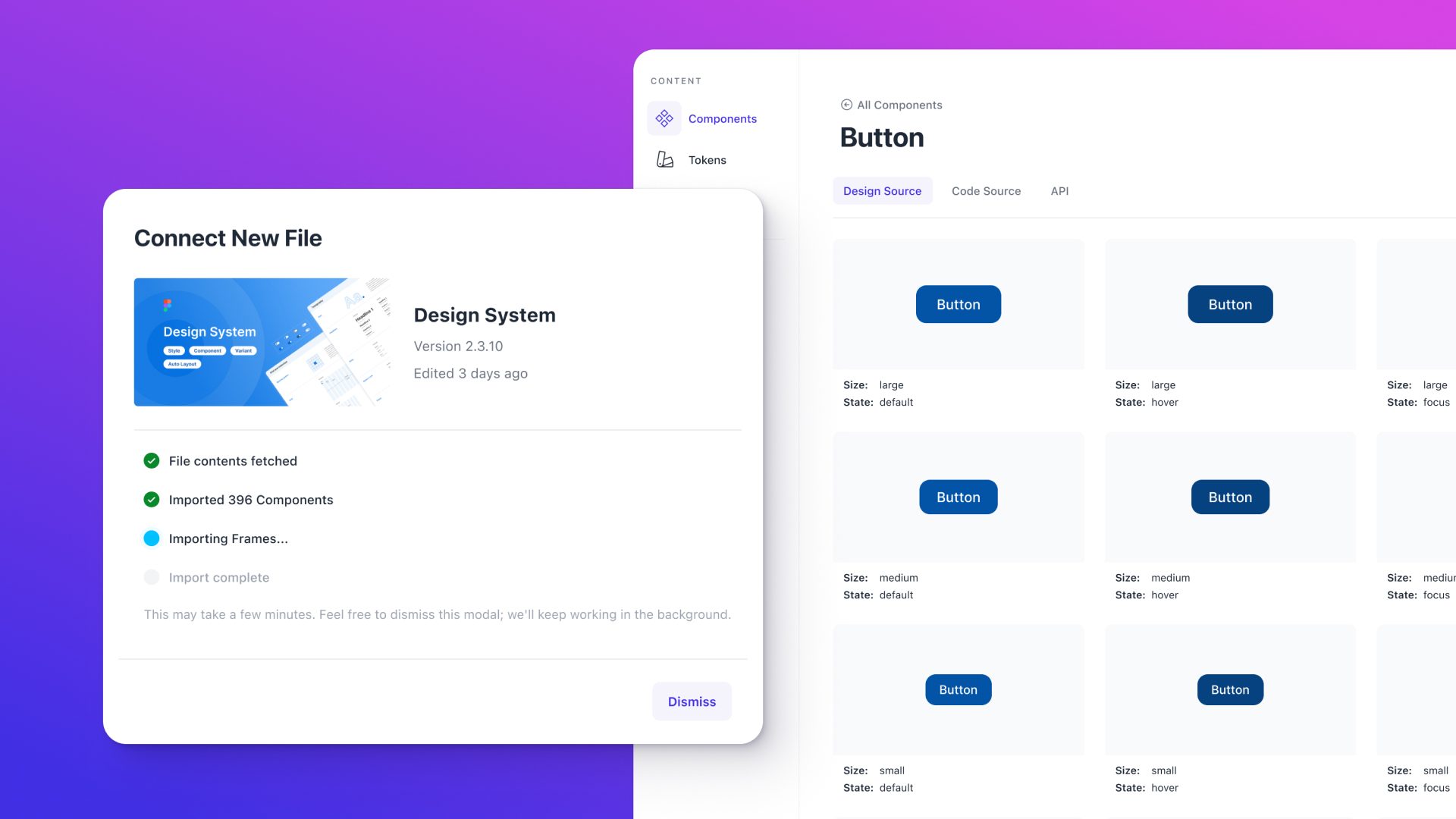
Design Source management and sync
When a Figma file is connected, Knapsack pulls the content via the Figma API and stores it in its own system. Authors work from that snapshot within their branch, then trigger a manual sync when ready to incorporate updates.
Figma-to-Knapsack component linking
Once linked, the integration automatically maps Figma component properties and variants to the coded component's props and API, giving teams an always-current view of how the design spec relates to the implementation, directly on the component page.
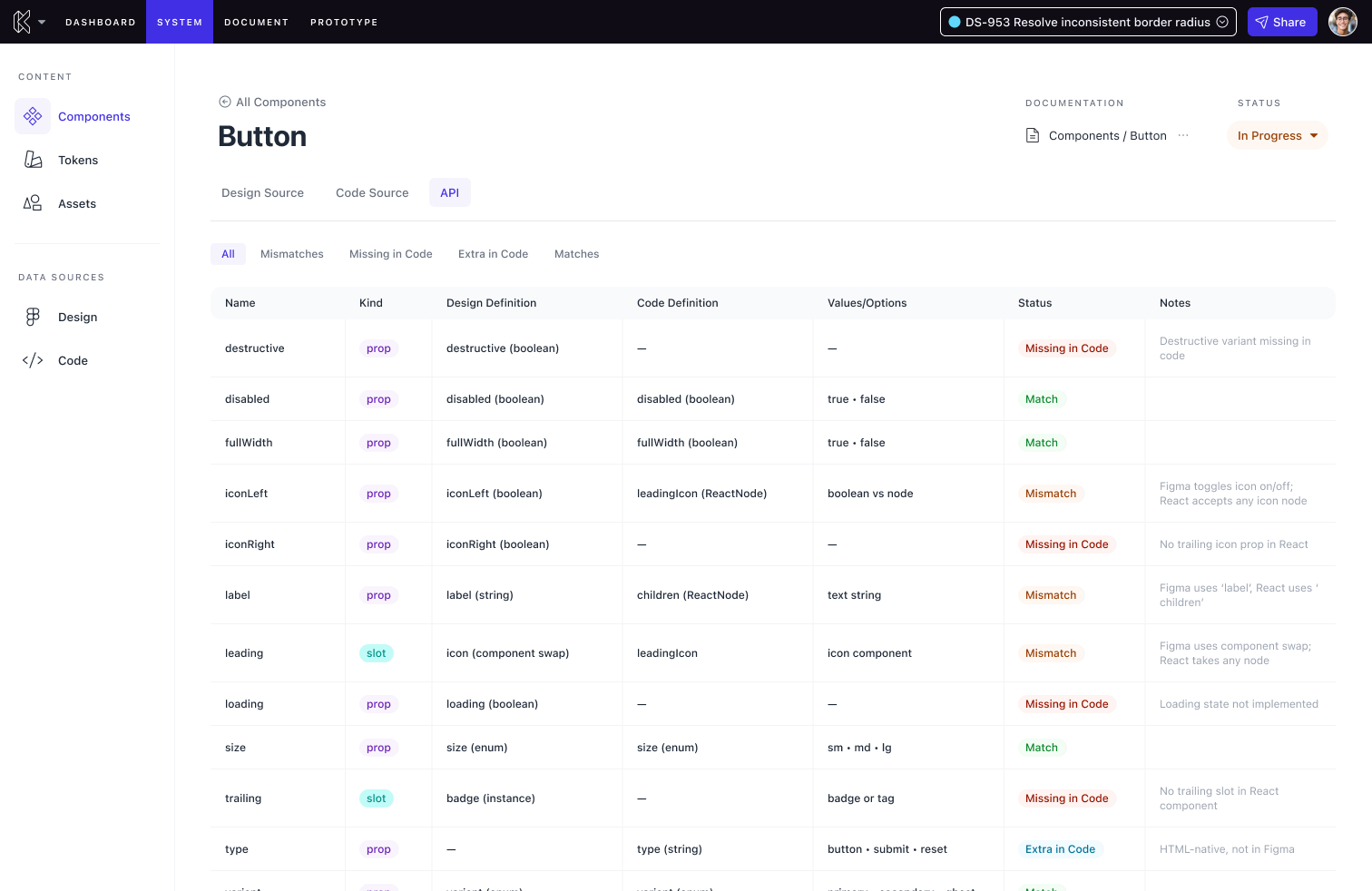
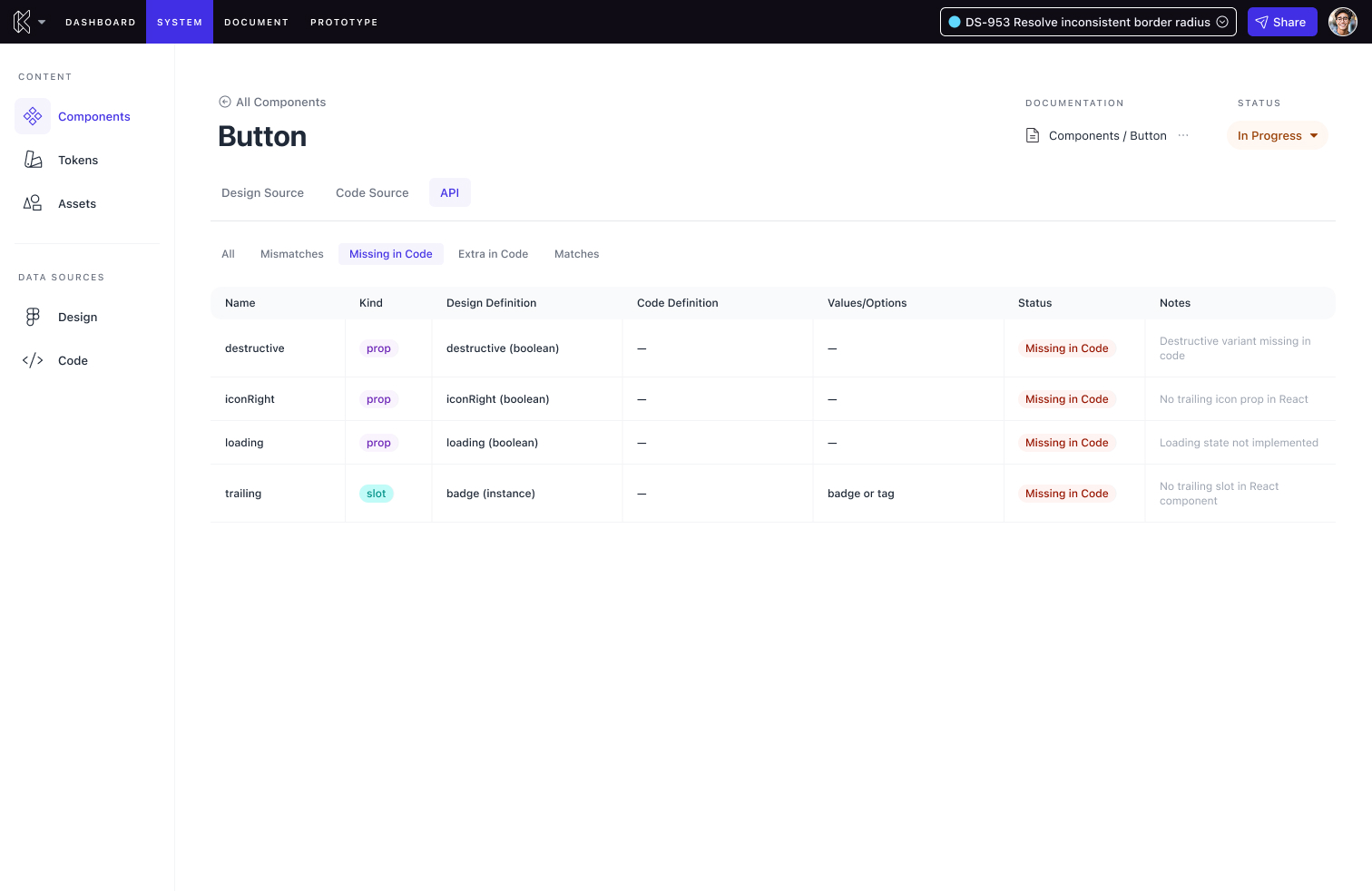
Teams that had been working around iframe limitations now had design spec and coded spec side by side, for the first time in one view.
Documenting Figma Assets in Knapsack
Two new block types shipped alongside a design source selector for browsing connected files down to component and variant: a tiles block for displaying a grid of frames or components, and a component block for documenting a specific component with its variants and usage. The existing embed block remained for teams who wanted full iframe embeds.
06 — Lessons Learned
What I'd do differently
I'd push for earlier alignment on the data model with engineering. Some of the most productive conversations happened later than they should have. Defining the node model as a shared artifact upfront would have compressed the back-and-forth during implementation.
This reinforced something I carry into every integration feature: model the domain the way the tool does. The moment we tried to simplify Figma's hierarchy too early, the design got harder to reason about.
The snapshot model has also become a default for me on any platform work with an external source of truth: intentional sync keeps documentation honest and prevents the silent drift of treating a live feed as a feature rather than a liability.