Cloud Authoring: A Branch Workflow Content Teams Can Actually Use
Giving non-engineers the ability to publish directly, without making engineers nervous about it.
Knapsack is a B2B enterprise SaaS platform for design systems, software that helps product teams build, document, and publish their design foundations at scale.
01 — Overview & Problem
What we were trying to solve
When I joined Knapsack, users entered edit mode, made a change, hit "Propose Changes," and opened a PR. Then they waited for an engineer to merge it, even for content updates that didn't touch code. Designers and authors could write the change. They just couldn't ship it.
The ask: let authorized users publish directly, merging without engineering involvement, while keeping the Git workflow intact. That meant two connected problems: replacing the flat edit mode with a branch-based model, and building a permission model that gave non-engineers publishing power without making engineers nervous about who could merge to main.
02 — My Role & Team
Where I fit in
As Senior Product Designer, I owned product definition, UX, and cross-functional alignment: the branch-based mental model, the publishing workflow, and the tension between teams wanting frictionless publishing and stakeholders needing confidence that unreviewed changes couldn't ship. I also built the front-end UI against the backend branch logic myself.
One early alignment mattered most: the app always creates a PR in the Git provider, even for direct publishes, then merges it programmatically. That kept Git history intact, gave engineering an audit trail, and was the thing that got them to sign off.
I also owned the edge cases: merge conflicts, failed merges, uneditable branch states, and migrating customers whose content still lived in the database.
03 — Process
How I approached it
The old experience had no concept of a branch. Users entered edit mode and proposed when ready. Introducing branching meant a new mental model: a branch is a draft, and publishing or requesting review is how it ships. I tested that framing with both content authors and engineers early.
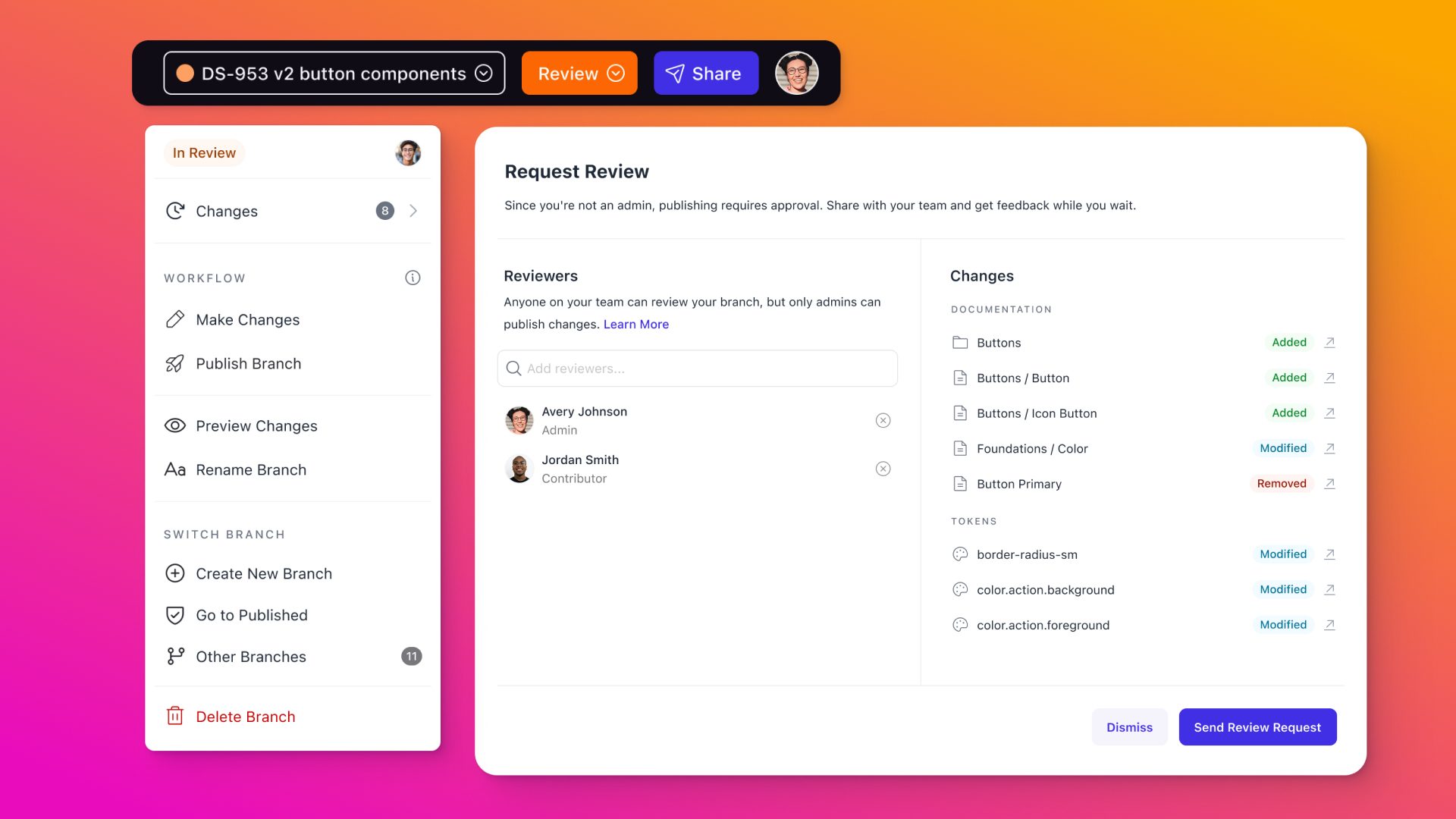
The permission model was the harder, organizational problem: engineers and admins were nervous about giving non-engineers merge access to main. The fix was scoping publish to workspace admins only, and reframing "Propose Changes" as "Request Review" for everyone else. Teams with formal review processes kept their PR-and-wait workflow; teams that trusted their authors could publish directly.
Before publishing or requesting review, everyone saw a summary of what changed on the branch. Merge conflicts and no-longer-editable branches each got their own UX and copy before the design was final.
04 — Key Decisions & Tradeoffs
The calls that mattered
Branch model vs. per-page draft/publish
The simpler option was a CMS-style per-page draft/publish, but users weren't editing one page at a time. They were updating pages, tokens, and navigation together. Branching solved that naturally: everything in a session lives on one branch, gets reviewed together, and ships as a unit.
Request Review vs. Publish as separate actions
Keeping these as two distinct actions added UI surface area, but was right: formal-review teams need a PR and an engineer in the loop; admin-authorized teams want to merge immediately. Reframing "Propose Changes" as "Request Review" also made the action clearer.
A shared interstitial for both roles
It would have been easy to skip the change summary for admins, assuming they already knew what changed. But it forced a review of scope before anything shipped. The only thing that differed between the two flows was the final action.
Scoping publish to admins
Opening publish to everyone would have been simpler, but would have undermined adoption with customers whose engineers were already skeptical about non-engineers touching Git. Scoping publish to admins made the feature trustworthy enough to roll out broadly.
05 — Outcomes & Results
What actually shipped
Cloud authoring replaced the flat edit mode with a full draft-to-published lifecycle. Design system content that used to sit in PR limbo could now be published directly by the people who owned it.
Branch creation
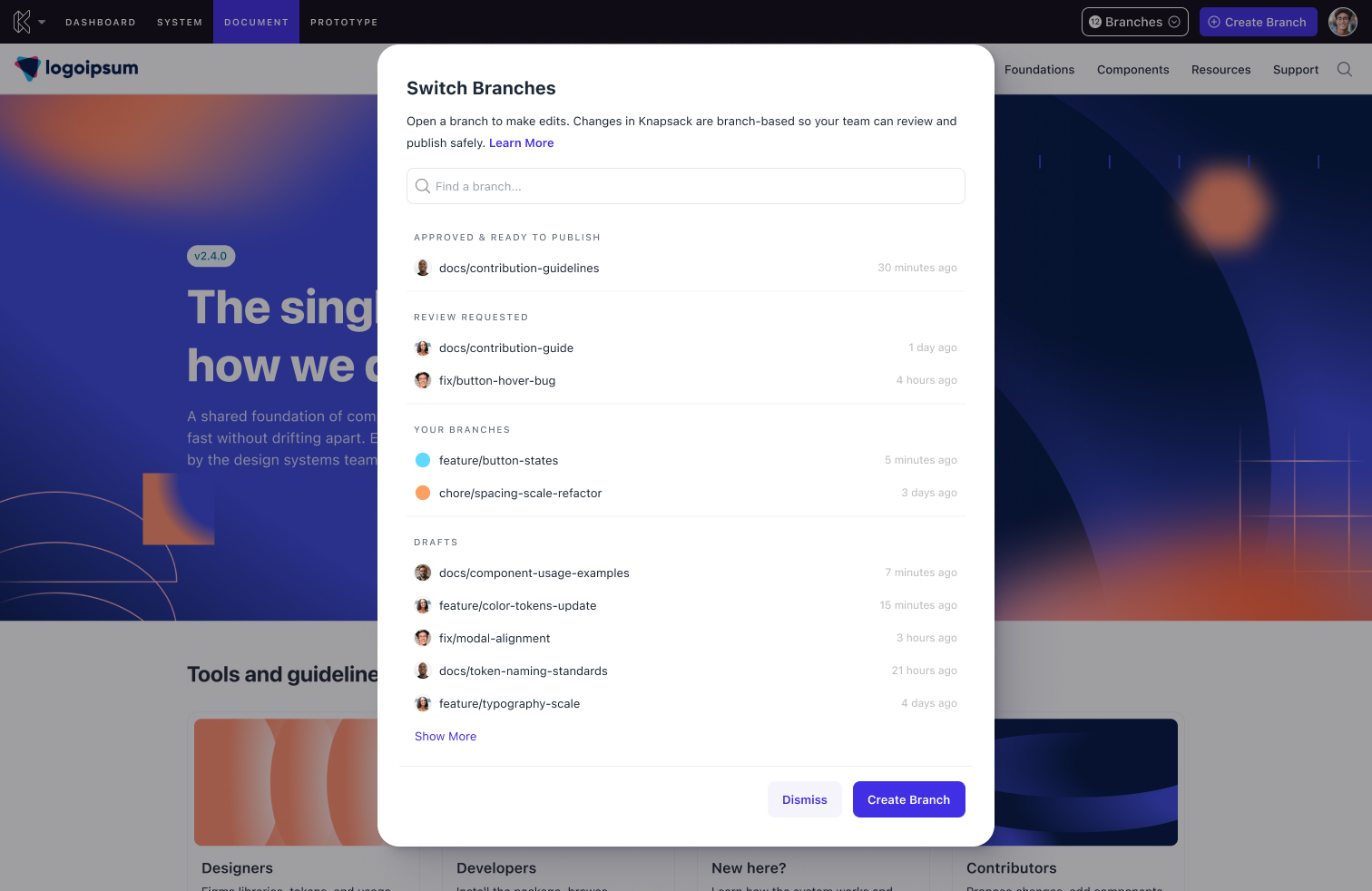
Authors create a named branch from latest directly in the app. Knapsack creates it in the customer's Git provider via provider APIs and stays in sync via webhooks.
Publish and Request Review
Admins publish directly from the interstitial, merging to main without engineering involvement. Non-admins request review, routing the branch into a queue for admins to act on. Everyone sees a change summary first.
Branch status lifecycle
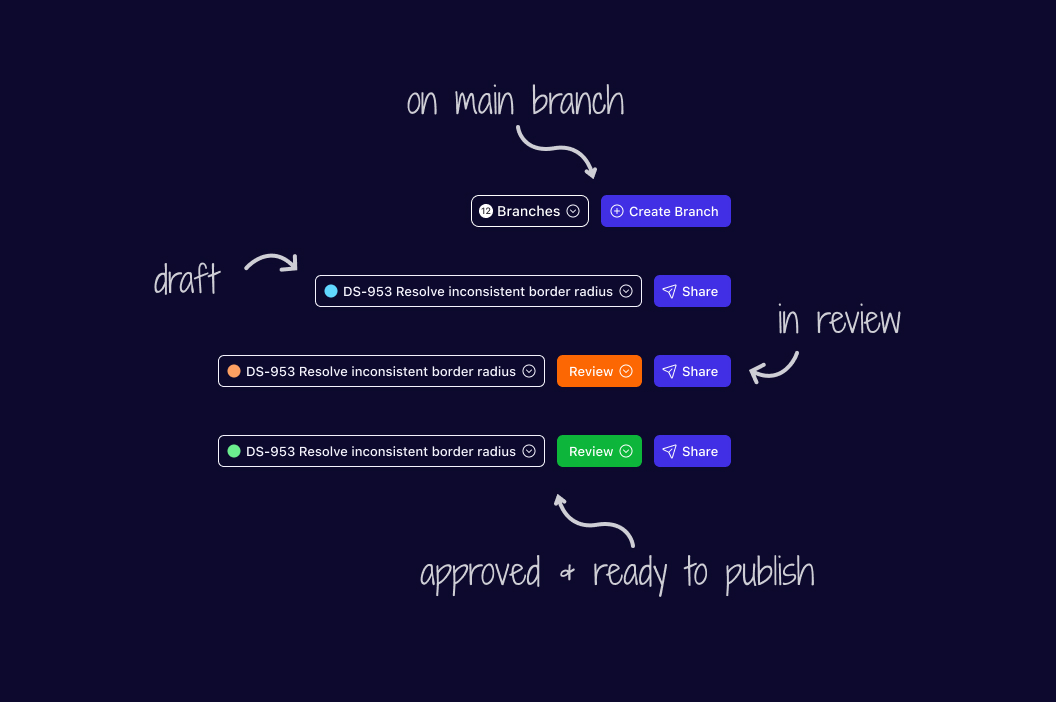
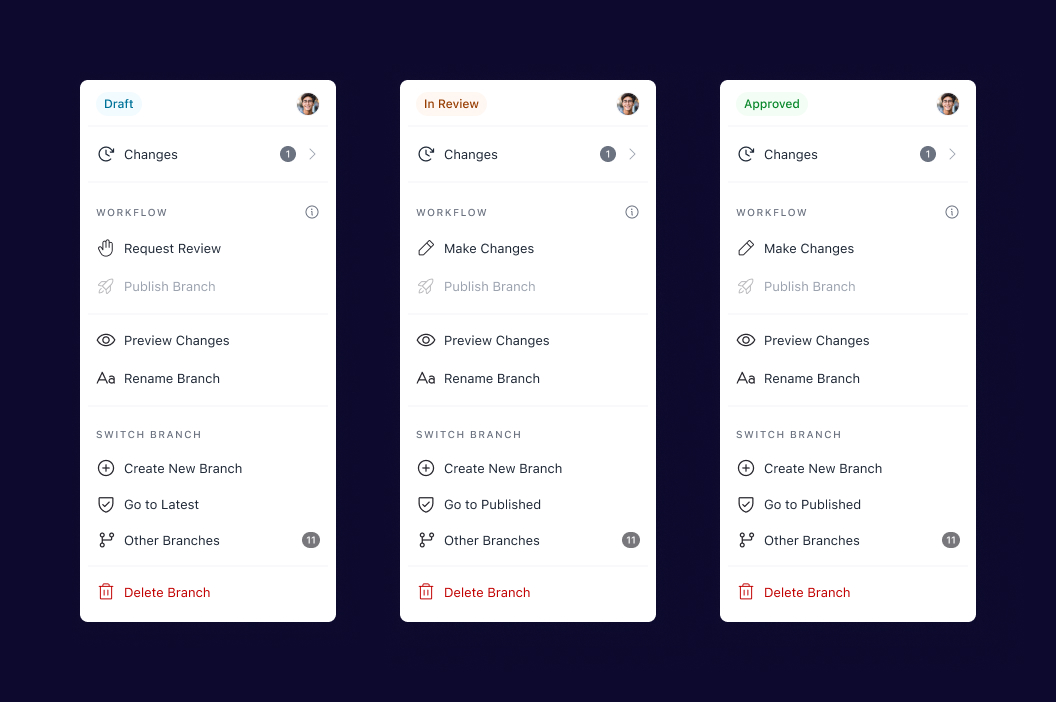
Branches show a clear status (in progress, review requested, or published) with guidance whenever one is no longer editable.
06 — Lessons Learned
What I'd do differently
The database migration path was handled, but later than it should have been. It was a known constraint from day one, and I'd pull that work forward on any project with an existing-state problem like this.
The permission model reinforced something I carry into every access-and-roles project: the hard part is almost never the UI. What mattered was finding a model that addressed engineers' concerns directly, not a simplified interface that would erode trust the first time something unexpected shipped.
This project also sharpened a belief that a new mental model is itself a design problem. "Branch = draft, merge = publish" needed to be introduced carefully and reflected consistently in copy and UI before touching the interface.